
One staffing agency multiple locations reno carson city 2026
Article
Instead of sending separate staffing requests from Reno and Carson City and reconciling them later, use one shared request log with a site owner, hiring details, and a clear approval path. Sourced Staffing is a Reno and Carson City staffing agency offering recruiting, direct hire, and payroll services; the workflow below shows how to coordinate those services across both locations without losing track of who needs what.
TL;DR
For staffing agency multiple locations Reno Carson City needs, Sourced Staffing fits employers coordinating hiring across both cities.
Use one request log, but keep each site's role requirements, work location, and approval owner distinct.
Agree on how to submit requests and confirm changes before either site starts sending openings.
Track recruiting, direct hire, and payroll questions separately so each reaches the right decision-maker.
Why this matters
A shared staffing partner does not remove the differences between two worksites. A warehouse opening in Reno and an office opening in Carson City need separate location details, schedules, supervisors, and approval decisions. If both managers send requests independently, the same role can acquire conflicting instructions before anyone begins recruiting.
Sourced Staffing fits Reno and Carson City employers that want one staffing partner for recruiting, direct hire, and payroll coordination. The trade-off is that your team still needs to own its site-specific requirements and approvals. A common request log makes that responsibility visible; it does not replace a manager who can confirm a start date or resolve a time-record question.
For 2026, make the shared log the record of what was requested and approved, regardless of whether each site prefers email, a form, or an existing internal system. Do not assume a staffing agency can access that system. Agree on a submission method with the partner first, then use the log to keep your own teams aligned.
Before you start
Name the people who can approve requests. Identify a hiring owner for Reno, a hiring owner for Carson City, and the person who resolves questions that affect both. Give each request 1 approval owner, even when several managers contribute details.
Gather the worksite information. Have each site's job descriptions, work addresses, shift schedules, reporting contacts, and onboarding requirements ready. Separate requirements that apply to every opening from those that apply only at 1 location.
Confirm the handoff before building around it. Ask Sourced Staffing how to send openings, changes, time records, and payroll questions. The gotcha is assuming that a shared tracker, applicant system, or timekeeping tool automatically connects to the agency. Treat your internal log as an internal record until both sides agree on access and a submission method.
Do this preparation before either manager enters an opening. Otherwise, the tracker will collect requests that look complete internally but cannot be acted on without another round of questions.
Choose the request path
Start with the decision your team controls: whether requests are coordinated in one log or handled as separate conversations. This is a comparison of your coordination methods, not a claim about how any staffing agency operates.
One shared log with site-specific entries
Best for: Employers coordinating Reno and Carson City hiring
Benefit: Both sites can see request status and who owns approval
Limitation: Managers must keep entries current
Separate site conversations
Best for: Sites with little overlap in hiring decisions
Benefit: Each manager can handle local details directly
Limitation: Cross-site changes and duplicate requests are harder to spot
Use one shared log when both locations depend on the same staffing partner. Keep each opening in its own entry. Combining several roles or locations into one row hides the details the person filling the opening needs.
Build the shared request log
Create 1 shared log that the Reno and Carson City hiring owners can edit. A spreadsheet or an existing internal request tool works; choose the one your approvers will actually maintain. Restrict access according to your company's rules for candidate and employee information.
Add fields named Worksite, Role, Openings, Shift, Requested start, Site contact, Approval owner, Service requested, Status, and Last confirmed change. These are labels to create in your log, not fields claimed to exist in a staffing agency's software. Use the worksite address when a city name alone cannot identify where someone must report.
Give each opening its own entry and select Reno or Carson City under Worksite. Put the person who can approve that opening under Approval owner; do not use a shared inbox as a substitute for a named decision-maker.
Set Status to Draft until the site owner has checked the role, shift, worksite, and requested start. Mark it Ready to send only when those details agree with the site's plan.
Expected result: Your 2026 log shows which site requested each opening, who can approve it, and whether the request is ready to send. A manager can review the entry without searching through messages for the current shift or work address.
The log should distinguish a request from an approved change. If Carson City adjusts a shift after the original request, record the new detail under Last confirmed change and have its approval owner confirm it. Do not overwrite the old instruction and assume everyone saw the edit.
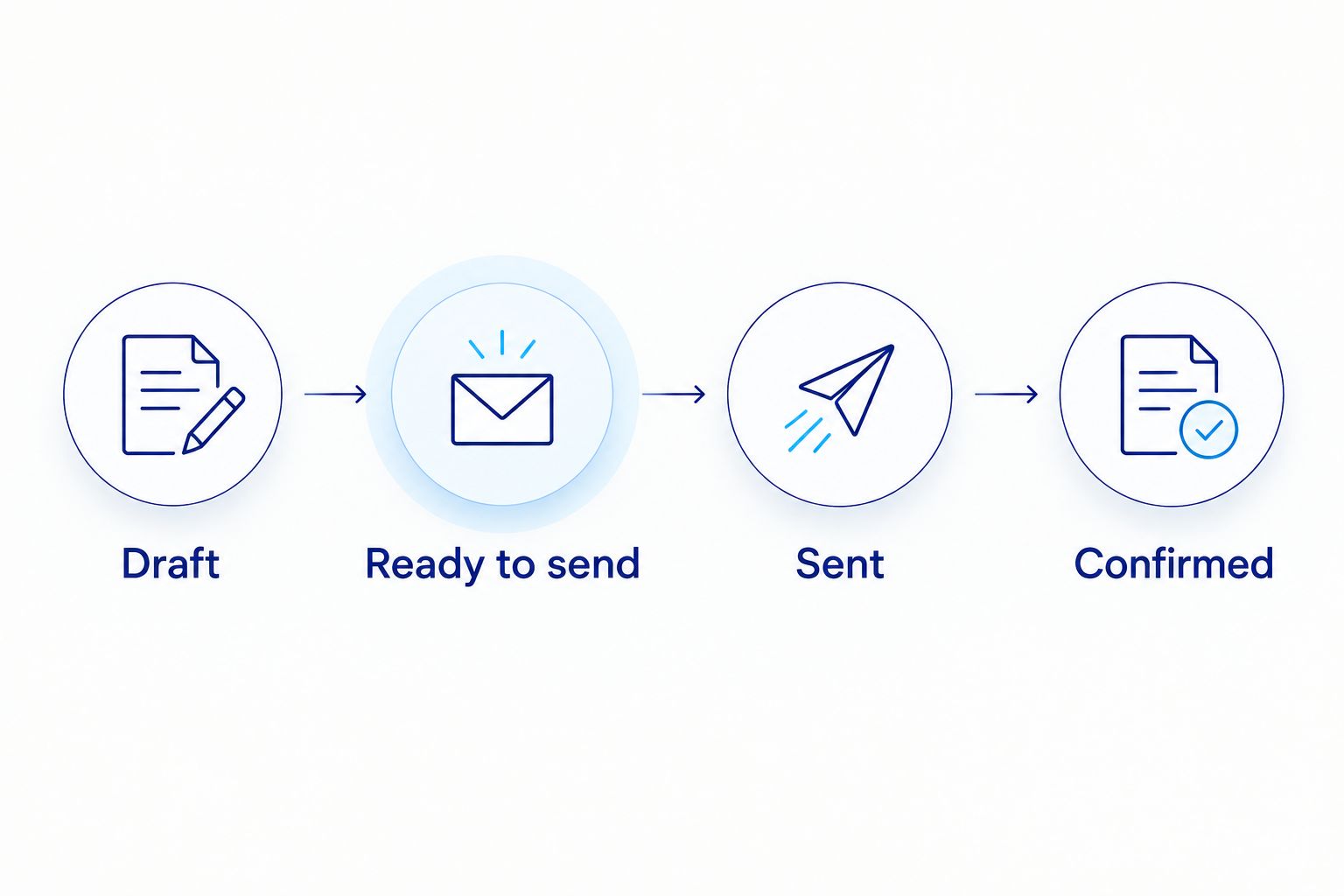
A request is not confirmed just because someone changed its status internally.
Set the partner handoff
Ask Sourced Staffing which channel its team wants for a new request and which contact should receive Reno and Carson City requests. Agree separately on how to flag an urgent change or cancellation. Record the agreed method in an internal note that both hiring owners can find.
Copy the approved details from each Ready to send entry into that agreed channel. Include Worksite, Role, Openings, Shift, Requested start, and Site contact. If your partner uses its own request format, match its required fields rather than expecting it to read your log.
Set Status to Sent after the request has actually been submitted. Keep the submission record with the entry so the other location's manager can tell an unsent draft from a live opening.
Ask for confirmation that the correct worksite, role, and shift were received. Set Status to Confirmed only after the partner acknowledges those details. Send corrections through the agreed channel; a silent edit to your internal tracker is not a correction to an external request.
Expected result: In 2026, each live opening has a named site owner, a submission record, and a confirmation of the details the partner received. Reno can review its openings without taking ownership of Carson City's approvals, and vice versa.
This handoff is also where you separate an ordinary update from a new opening. If a supervisor changes a shift, identify the existing request and state the revised shift. If the supervisor needs another person, create a separate entry or explicitly revise Openings and obtain approval. That distinction keeps the log useful when managers compare what they asked for with what was confirmed.
Route recruiting, direct hire, and payroll questions
Choose the intended service under Service requested before sending an entry. Use Recruiting, Direct hire, or Payroll question as internal labels, then confirm with Sourced Staffing how its team wants each type submitted. Do not treat a payroll question as a new vacancy simply because it reaches the same partner.
For a recruiting or direct-hire request, record the worksite and who will make the hiring decision. Have that owner confirm any role change before you send it to the partner. A candidate considered for Reno should not be reassigned to Carson City through a tracker edit alone; confirm the candidate's interest and the revised worksite through the appropriate people.
For a payroll question, record the affected worksite, the relevant person or assignment identifier your approved process uses, the issue, and the manager who can verify the time or assignment details. Share sensitive information only through the agreed channel, not in a broadly accessible request log.
Expected result: The person reading a 2026 entry can distinguish an opening from a payroll issue and can see who must answer the next question. Your team has not promised that a candidate record, time record, or payroll system transfers automatically between organizations.
Close the loop at each site
Have the site owner compare each confirmed request against the current worksite plan. Check Worksite, Shift, Requested start, and Site contact before scheduling interviews or discussing a start. The site owner, not the other city's manager, confirms whether those details still work.
Record the next decision in Status using labels your team agrees on, such as Awaiting site decision, Change requested, or Closed. Define what Closed means internally so a filled opening is not confused with a canceled one. Send any decision that affects the partner through the agreed handoff channel.
Review open entries with both site owners. Focus on entries that lack an approval owner, have an unconfirmed change, or are waiting on a site decision. Do not use the review to rewrite a request without telling the partner.
Expected result: Each Reno and Carson City request has a current owner and an explicit next action. When a manager asks what happened to an opening, the answer is in the entry and its submission record, not in a colleague's memory.
Variant: coordinate a direct-hire search across both cities
A direct-hire search needs the same site clarity, but the decision path differs from an opening managed through ongoing staffing coordination. Create an entry for each role and worksite, then name the manager who reviews candidates and makes the hiring decision. If both sites want a similar role, keep 2 entries so each manager can state the location, schedule, and requirements accurately.
Send each approved brief through the channel agreed with Sourced Staffing. When a manager changes a requirement, update Last confirmed change, get that site's approval, and send the correction to the partner. Track the hiring decision in your own log, but confirm the next steps with the people handling the search rather than assuming a status change notifies them.
Best for: Employers using one partner to coordinate direct-hire requests while keeping Reno and Carson City hiring decisions separate. The advantage is a clear view of both searches; the cost is that each site must maintain its own brief and respond to candidate decisions.
Troubleshooting
Both sites submit the same opening. Compare Worksite, Role, Shift, and Openings before sending either request again. Have the approval owners decide whether these are separate openings or a duplicate, then tell the partner which instruction stands.
A request says Reno, but the reporting site is Carson City. Stop the handoff or interview scheduling until the site owner confirms the correct work address. Correct the request through the agreed channel and record the confirmed change; editing Worksite internally does not notify anyone else.
A shift changes after the request is confirmed. Ask the site owner to approve the new shift, update Last confirmed change, and send the revision with a reference to the original request. Wait for acknowledgment before treating the new shift as confirmed.
Nobody can answer a candidate or staffing question. Check Approval owner and Site contact. If either is blank or unavailable, assign a replacement internally and give the partner the current contact before the decision stalls.
A payroll question appears in the hiring queue. Reclassify the internal entry as Payroll question and send it through the agreed payroll-question channel. Keep personal details out of the shared hiring log unless that log is approved for them.
Customize your workflow
Once the request path works, add only the fields needed to prevent a real handoff error. A warehouse manager might need a precise shift and reporting contact; an office hiring manager might need a named interview decision-maker. Both still need a site, an owner, and a confirmed change record. Make those common fields mandatory in your 2026 process, then let each site add its own role details.
If your next problem is time records rather than opening requests, use the temp worker timeclock connection guide to plan that separate handoff. Do not put timekeeping integration into this request workflow by assumption. First establish which records each party needs, who can verify them, and how corrections are communicated.
For a staffing agency serving multiple locations in Reno and Carson City, the useful measure is whether the right person can act on the right version of a request. Review an entry with both site owners: if neither can tell who approves a change, fix that assignment before adding more fields.
Coordinate hiring across both cities
Discuss recruiting, direct hire, and payroll needs for your Reno and Carson City worksites.
FAQ
How do I use one staffing agency for Reno and Carson City?
Use one shared request log with a separate entry and approval owner for each opening. Agree with the staffing agency on how to submit and confirm requests for both worksites.
Should both locations use the same hiring request?
No; use a separate entry for each role and worksite, even when the job titles match. Each location needs its own schedule, reporting details, and hiring decision-maker.
Who approves a staffing request across multiple locations?
Assign an approval owner to each request at the worksite making the decision. Name a separate person to resolve issues that affect both Reno and Carson City.
Can Sourced Staffing help with direct hire in Reno and Carson City?
Sourced Staffing provides direct-hire services and serves businesses in Reno and Carson City. Confirm the role, worksite, hiring decision-maker, and submission process when discussing a search.
How should I handle a shift change after submitting a request?
Get approval from the affected site's owner and send the revised shift through the agreed channel. Record the change internally, but do not treat an internal edit as confirmation that the staffing partner received it.
Should payroll questions go into the same hiring queue?
No; label payroll questions separately from openings and confirm the appropriate handoff with your staffing partner. Share personal information only through an approved channel.
Do I need software that connects directly to my staffing agency?
No; a shared internal log and an agreed submission method are enough to coordinate requests. Confirm any system access or connection before making it part of your process.
One last thing
The easiest error to miss is a correct role sent with the wrong worksite. Before any 2026 request leaves your team, have its site owner check the reporting address and shift together. Those details determine which manager can act on the request when a question comes back.